Skip to content
BaalBo Infotech
baalbo-swaad.myshopify.com
Baalbo Swaad Shopify theme: full home page

Scroll inside the preview to see the whole home page

Sweets & Snacks New release

Baalbo Swaad Shopify Theme

Version 1.0.0 Updated 23 Nov 2026 Online Store 2.0

A premium Shopify theme for mithai, namkeen and dry fruit brands

Choose a licence

Prices include taxes. Add your business name and GSTIN at checkout to get a GST invoice.

View live demo Opens the full theme · password Baalbo

Frequently bought together

Baalbo Swaad themeSelected licence ₹5,999
Total ₹5,999
  • Instant ZIP download
  • Secure Razorpay checkout
  • Free updates in your dashboard
  • GST invoice

Lifetime licence: how it works

Active
KeyBBT-XXXX-XXXX-XXXX-XXXX
Storeyourstore.myshopify.com
  • Pay once: no renewals or monthly fees.
  • Activates by itself when you paste the key in Theme settings.
  • Move to another store any time from your dashboard.
Features

Everything that makes Baalbo Swaad sell

  • Online Store 2.0: drag-and-drop sections on every page
  • 74 sections and 17 page templates
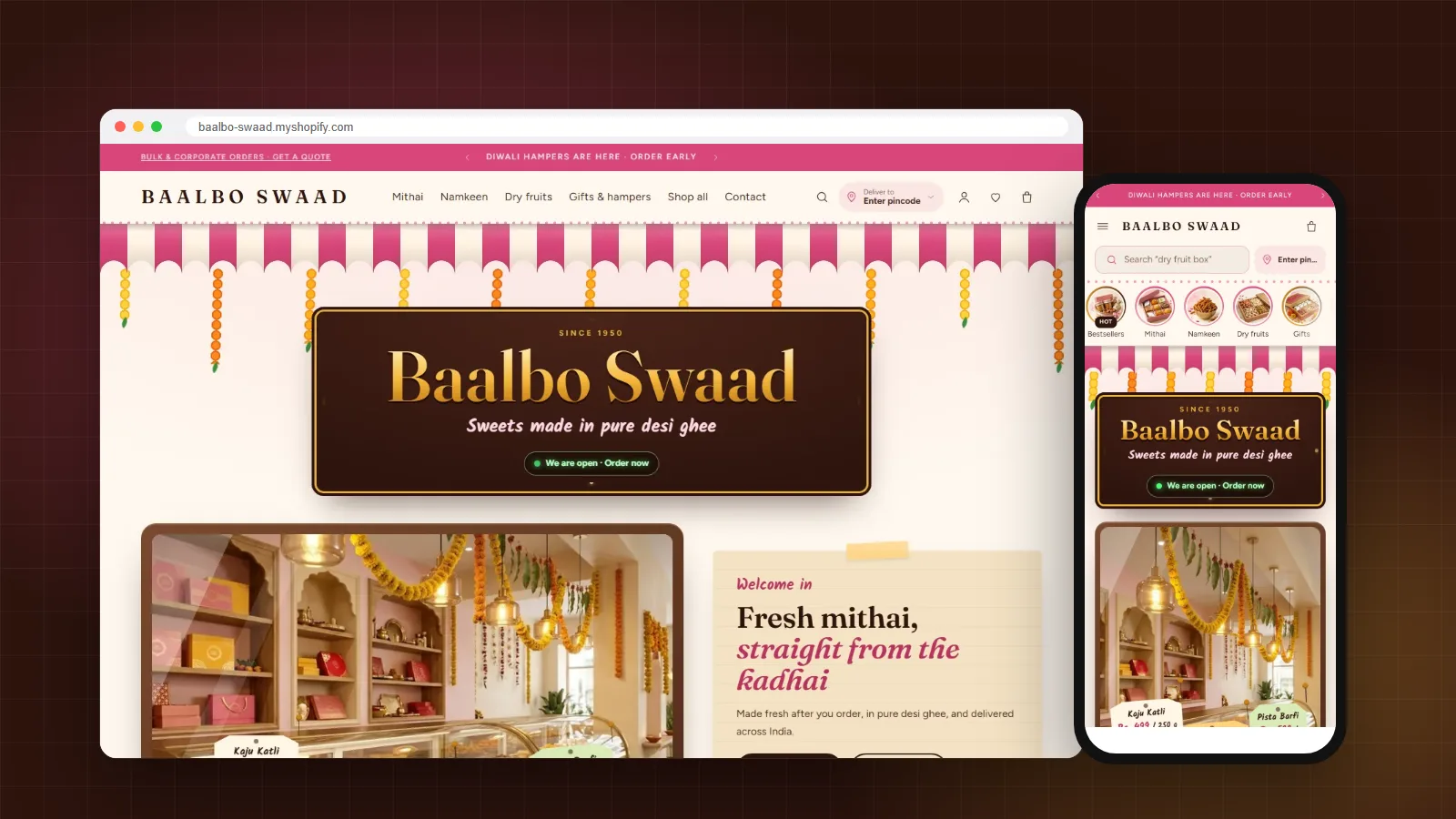
  • Shop front hero with a live "open now" sign
  • Glass counter with tarazu weight picker
  • Today's prices chalk rate board
  • Build your own mithai box
  • Live kitchen with today's batch schedule
  • Festival countdown to the last order date
  • Shop by region postcards
  • Corporate and bulk gifting enquiry form
  • Veg mark, diet badges and FSSAI number
  • Freshness, shelf life and what's inside from metafields
  • Gift note saved with the order
  • Pincode delivery estimate with city name
  • Fresh items limited to your local pincodes
  • Header with 6 layouts and mega menu with picture tiles
  • Mobile app bar and mobile cart bar
  • Predictive search with rotating hints
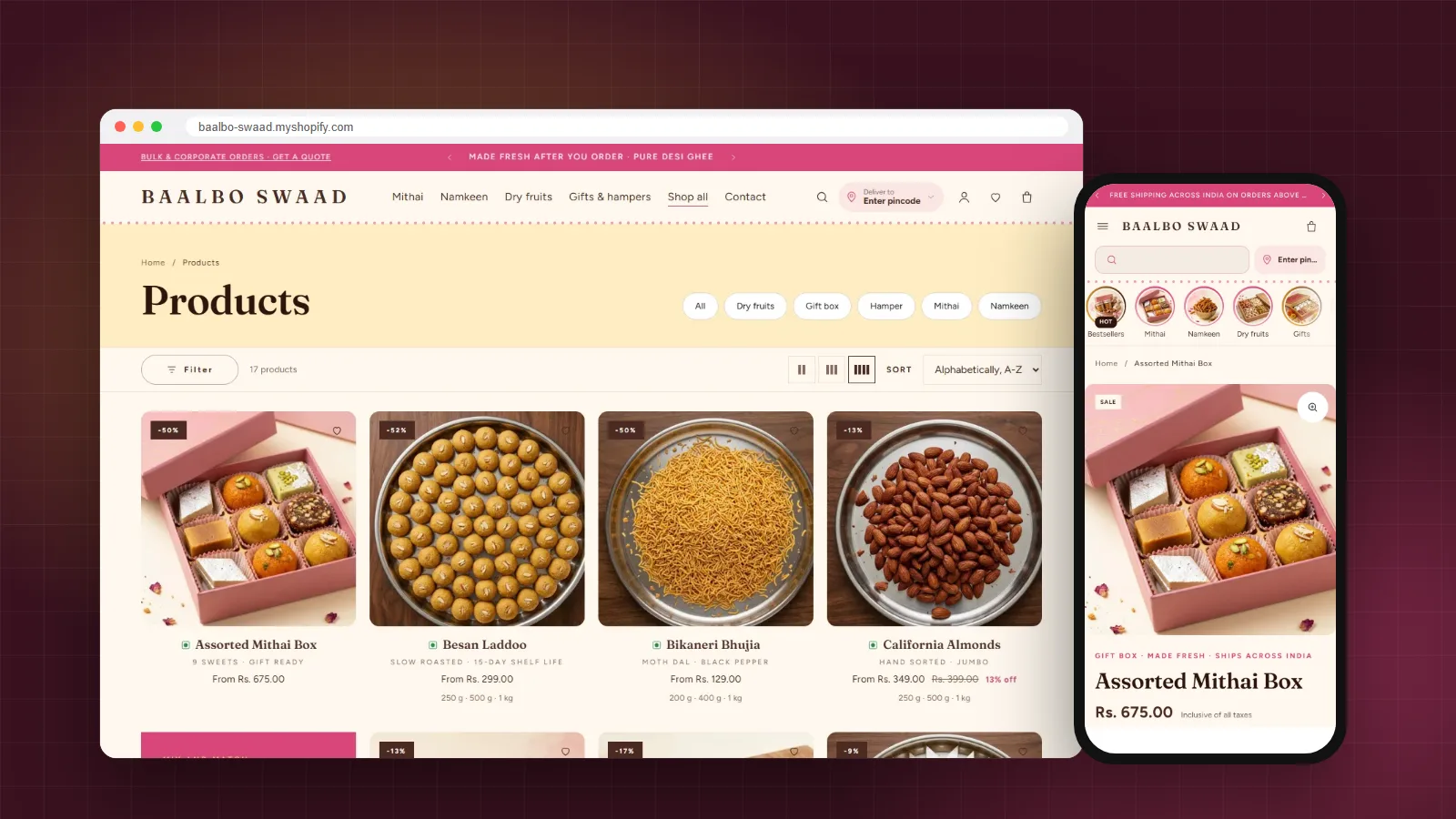
  • Collection filters, sorting, quick add and wishlist
  • Cart drawer with coupons, offers, add-ons and order note
  • Bundle builder, gift finder and shoppable videos
  • How it's made steps, timeline and testimonials
  • Floating WhatsApp button
  • Licence key for 1, 2 or unlimited stores
About the theme

About Baalbo Swaad

Baalbo Swaad turns your Shopify store into a real mithai shop: a shop front with a live open sign, a glass counter with a tarazu weight picker, today's rate board, build your own mithai box, a live kitchen, festival countdowns and corporate gifting. Online Store 2.0, 74 sections, 17 templates.

A premium Shopify theme that feels like your mithai shop

Baalbo Swaad is built for mithai shops, halwais, namkeen brands, dry fruit stores and Indian sweet makers. The store opens like a real sweet shop: a striped awning, marigold strings, a painted signboard with a live "open now" sign, and a glass counter full of thaals. Warm colours, playful details and big food photos make every page look delicious, and every section is designed for phones first.

Made for buying sweets online

  • Shop front hero with an awning, signboard and a live "We are open" sign that follows your opening hours (India time), and a shop window photo with price tags that link to products.

  • Glass counter: products sit on the shelves of a lit display case. Tapping a thaal opens a tarazu where shoppers pick a weight, watch the scale tip and add to cart.

  • Today's prices: a chalk rate board with today's date, every product of a collection, the price of each pack size from your variants, and when it was made.

  • Build your own mithai box: shoppers choose a box size and fill its cups with any sweets. Each sweet goes to the cart tagged with its box number, so your team knows what goes in which box.

  • Inside our kitchen: a live kitchen window with today's batch schedule. The batch cooking right now is highlighted and earlier ones are marked ready.

  • Festival countdown: add your festivals once a year. The section counts down to the last day to order for delivery before the festival, then moves on to the next one.

  • Shop by region postcards (Rajasthan, Bengal, Karnataka and more) with each region's famous sweets.

  • Corporate and bulk gifting enquiry form for Diwali gifting, weddings and events, sent to your store email.

A product page that answers every question

  • Weight picker on a tarazu for 250 g, 500 g, 1 kg or any pack size you sell.

  • Food badges: veg, non-veg, egg, eggless, vegan or Jain mark from each product, your own badges such as "pure desi ghee", and your FSSAI licence number.

  • Freshness: shelf life, storage and allergens, and what's inside the box, from each product's metafields.

  • Gift note with To, From and a message, saved with the order.

  • Delivery estimate with pincode: shoppers enter their pincode once in the header and see the city name and delivery date. Fresh items can be limited to the pincodes you deliver to.

  • Sticky add to cart, image zoom, offer box, WhatsApp help and complementary products.

Easy to browse, easy to buy

  • Header with 6 desktop layouts, a mega menu with picture tiles, a "Deliver to" pincode pill and a search bar with rotating hints on mobile.

  • Mobile app bar and a mobile cart bar, like a food delivery app.

  • Collection filters, sorting, quick add and wishlist.

  • Cart drawer with offer messages, coupon codes, a "spend more" offer, add-on products and an order note.

  • Bundle builder, gift finder quiz, shoppable videos, shop the look and recently viewed.

Tell your story

  • How it's made steps from sourcing to packing, timeline for your family history, testimonials, press quotes, Instagram feed, store locations and a blog.

  • A footer with your tagline, promise icons and a newsletter sign-up.

Yours to customise, no coding needed

Baalbo Swaad is an Online Store 2.0 theme with 74 sections and 17 templates, including About, Contact, FAQ and Wishlist pages. Change colours, fonts, buttons, product cards, badges and animations from the Shopify theme editor and drag sections around on any page.

What you get

  • The theme .zip, ready to upload to Shopify, and every future version from your BaalBo dashboard.

  • A licence key for 1 store, 2 stores or unlimited stores.

  • A GST invoice for your purchase.

  • Optional setup by BaalBo: we install the theme, add your branding and connect it for you.

Launch in days, not months

From download to live store

No developer needed. Upload Baalbo Swaad, add your brand and products, and launch a store that looks premium from day one.

  1. 01 Upload the themeDownload the .zip from your BaalBo dashboard and upload it in Shopify: Online Store → Themes → Add theme.
  2. 02 Paste your licence keyOpen Customize → Theme settings → Theme licence and paste your key. The store is activated straight away.
  3. 03 Add your brand and go liveChange colours, fonts and sections in the theme editor, add your products and publish.
  4. Buy Baalbo Swaad

Version history

Buyers download every new version from their dashboard with the same licence.

  1. v1.0.0 23 Nov 2026

    First release: 74 sections, 17 templates, shop front hero, glass counter with tarazu weight picker, rate board, build your own mithai box, live kitchen, festival countdown, food badges, pincode delivery, corporate gifting and licence activation for 1, 2 or unlimited stores.

Guides for sweets & snacks stores

All articles

More Shopify themes

All themes
FAQ

Baalbo Swaad: questions before you buy.

Installation, licences, payment and setup.

S B +

Still have questions?

Chat with our team on WhatsApp or give us a call. No sales pitch, just honest answers.

01 Which stores is Baalbo Swaad made for?

Mithai shops, halwais, namkeen and snacks brands, dry fruit stores, bakeries selling Indian sweets, and gifting brands that sell festival hampers. It suits any food brand that sells by weight and wants a warm, traditional Indian look.

02 How many stores can I use Baalbo Swaad on?

It depends on your licence: the single-store licence works on 1 Shopify store, the two-store licence on 2, and the unlimited licence on as many stores as you like. Each store is added to your licence automatically the first time the theme runs with your key.

03 How do I install the theme and add my licence key?

Download the .zip from your BaalBo dashboard. In Shopify go to Online Store → Themes → Add theme → Upload zip file. Then open Customize → Theme settings → Theme licence and paste the licence key from your dashboard.

04 How do weights and prices work?

Create a variant for each weight (for example 250 g, 500 g and 1 kg) with its own price. The tarazu on the product page and the glass counter let shoppers pick a weight, and the rate board lists the price of every weight. Prices are the ones you set in Shopify.

05 How does the build your own mithai box work?

Shoppers choose a box size and fill its cups with any sweets. Each sweet is added to the cart as its own line, tagged with the box number, so the order shows what goes in which box. The box saving shown is for display: create the same discount in Shopify admin, or enter its code in the section so it is applied when the box is added.

06 Does the pincode check confirm that my courier delivers there?

No. Shoppers enter their pincode and the theme shows the city name and an estimated delivery date from your settings. You can limit fresh items to a list of local pincodes. It does not check courier coverage; use a delivery app for that.

07 Is the "open now" sign and kitchen schedule automatic?

Yes, from what you set. The open sign follows the opening hours you enter, and the kitchen highlights the batch that is cooking now from the batch times you add, both in India time. They don't connect to your kitchen or shop systems.

08 Where do corporate gifting enquiries go?

The corporate gifting form is sent through Shopify's contact form, so enquiries arrive in your store email with every field labelled.

09 Do I get updates?

Yes. New versions are added to your BaalBo dashboard and you download them with the same licence key.

10 What does "Setup by BaalBo" include?

Our team installs Baalbo Swaad on your store, adds your logo, colours and fonts, sets up the menus, homepage, weights, rate board, festival dates and product metafields for freshness and food badges, so your store is ready to sell.

11 How do I install a theme I bought?

Download the .zip from your dashboard. In your Shopify admin go to Online Store → Themes → Add theme → Upload zip file, then preview and publish. If you added setup at checkout, our team does this for you.

12 What is the difference between the licences?

A Single store licence lets you use the theme on one Shopify store. Two stores covers two stores, and Unlimited covers as many stores as you run, which suits agencies and brands with several stores.

13 How do I pay?

Checkout is handled by Razorpay, so you can pay with UPI, debit or credit card, net banking or a wallet. Prices are in Indian rupees.